From profile URL to verified work email

LinkedIn Email Finder

Give us a LinkedIn profile URL and get the person's verified work email at the company they work at today. Paste or upload up to 10,000 profiles in the dashboard, or use the API.

100 free credits on sign-up. 1 credit per search.

Why LinkedIn lists bounce

A LinkedIn profile tells you who someone is. Turning it into an email that delivers is where most tools go wrong.

Stale employers

Database tools lag job changes by months. The email they hand you is at a company the person left, so it bounces or is ignored.

The wrong domain

A company's website is not always where its email lives. Search the website domain of a company that gets email elsewhere and you come back empty.

Unverified guesses

Many finders return the most likely pattern and leave you to find out if it delivers. Every guess that bounces costs you sender reputation.

How it works

We search live rather than relying on a database that goes stale.

1

Give us LinkedIn profile URLs

Paste up to 10,000 profile URLs or upload a CSV in the dashboard, or send them to the API one at a time or in bulk. No names or company domains needed.

2

We check where they work today

We identify the person's current employer and the domain that company actually receives email at, even when that's not its website.

3

We find and validate the email

We find the work email and validate it, including on catch-all domains and behind secure email gateways. You only get emails that deliver.

Use it your way: web app or API

Same search, same verification, same price. Pick whichever fits how you work.
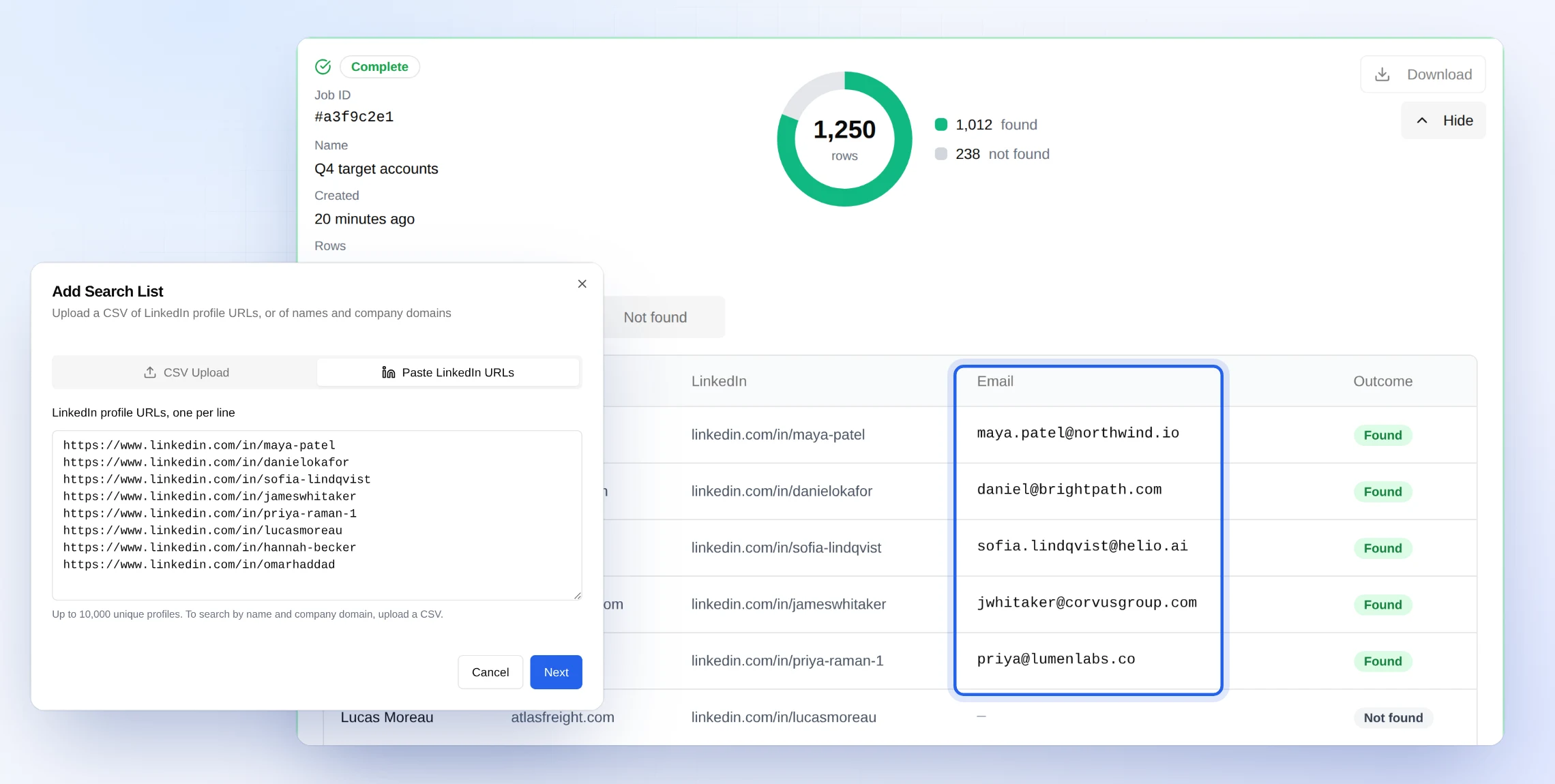
The OrbiSearch web app: a pasted list of LinkedIn profile URLs and the finished list with a verified work email for each person
Verified work emails

Web app

No code needed.

  • Paste up to 10,000 profile URLs, or upload a CSV
  • Watch results come in, then filter found and not found
  • Download the finished list as a CSV
POST /v1/email-lookup200 OK
// request
{ "linkedin_url": "linkedin.com/in/jane-doe" }

// response
{
  "full_name": "Jane Doe",
  "employer_name": "Acme",
  "email": "[email protected]",  "status": "safe"
}
Verified work email

API

For your own app, CRM or workflow.

  • One profile at a time with POST /v1/email-lookup
  • Up to 10,000 at a time with POST /v1/bulk-lookup
  • JSON results with the person, their employer and the email

The right company, and the right email domain

Some companies list a website that doesn't receive email, like a brand bought by a bigger company whose staff now email at the parent's domain. We work out the domain the company actually gets email at, confirm it belongs to the same company, and search there.

76%

of the emails we used to miss at these companies are now found when we re-run past searches.

2 fields

domain is the company's website. email_domain is where the company hosts its email. You always see which is which.

What you get back

The same result as a name and domain search, plus who the person is and where they work now. In the dashboard it's a CSV download; over the API it's JSON.

Verified work email at the person's current employer
First name, last name and full name
Current employer and its LinkedIn company page
Company website domain (domain)
The domain the email is at (email_domain)
Email provider, MX, catch-all and gateway flags

POST /v1/email-lookup (response, abridged)

{
  "linkedin_url": "https://www.linkedin.com/in/jane-doe",
  "full_name": "Jane Doe",
  "employer_name": "Acme",
  "employer_linkedin_url": "https://www.linkedin.com/company/acme",
  "domain": "acme.com",
  "email_domain": "acme.com",
  "email": "[email protected]",
  "status": "safe",
  "substatus": "deliverable",
  "is_domain_catch_all": false,
  "credits_consumed": 1
}

LinkedIn URL or name and domain?

Both cost 1 credit per search and return only verified emails. Pick the one that matches the list you have.

Search by LinkedIn URL when

  • Your list is profile URLs, from Sales Navigator, a CRM or a recruiter export
  • You don't have clean company domains
  • The list is a few months old and people may have moved

Search by name and domain when

  • You already have first names, last names and company domains you trust
  • You want the highest find rate on a fresh list
  • You want to try a single search for free, with our free email finder

Frequently Asked Questions

What do I need to find someone's email from LinkedIn?

Only their LinkedIn profile URL, for example linkedin.com/in/jane-doe. You don't need their name, their company or its domain. We work those out and return them with the email.

What if the person has changed jobs?

We search at the company they work at today, not one from an old database record. If they've changed jobs, you get the email at their new employer rather than one at a company they've left.

Is every email verified?

Yes. Every email we return is validated, including on catch-all domains, behind secure email gateways and on greylisted mail servers. We don't return guesses. If we can't confirm a deliverable address, we return no email and tell you why.

Why do domain and email_domain sometimes differ?

domain is the company's website domain. email_domain is the domain the company hosts its email on. For almost every company they're the same. When a company's website doesn't receive email, for example a brand bought by a bigger company whose staff now email at the parent's domain, we find the email at the domain the company actually uses, after confirming it belongs to the same company.

How much does it cost?

1 credit per search, the same as searching by name and domain. In bulk, rows that aren't LinkedIn profile URLs are not charged. Unlimited plans cover LinkedIn searches too, in the web app and the API. You get 100 free credits when you sign up.

Should I search by LinkedIn URL or by name and domain?

Use the LinkedIn URL when that's what your list has, or when you need to be sure the person still works there. If you already have names and company domains you trust, searching by name and domain usually finds more, because it skips the employer check. Both cost the same and use the same verification.

Why might a profile come back without an email?

Each result says why. The most common reasons are a profile URL that doesn't exist (mistyped, or built by hand rather than copied from LinkedIn), a profile where we couldn't identify a current employer, or an employer with no company website. Otherwise we searched and couldn't confirm a deliverable address, and we return nothing rather than a guess.

Is there an API?

Yes. Send a linkedin_url to POST /v1/email-lookup for a single search, or a list of them to POST /v1/bulk-lookup for bulk. The response is the same shape as a name and domain search, plus the person and their current employer.

Turn your LinkedIn list into emails that deliver

Sign up free and run your first 100 searches on us. Paste or upload your profile URLs in the dashboard, or call the API.